Occupational health monitoring for mines, recorded the day it happens
Between annual medicals, the mine's occupational medical practitioner flags some workers for regular checks: blood pressure, glucose, a TB symptom screen, weight. The paramedics on site usually do those checks already, then write them on a spreadsheet that reaches the medical centre at month end. ODIN Occupational Health puts that work on a phone, shows who is due and overdue as it changes, and sends every visit to the mine's occupational health system automatically.
The problem with a month-end spreadsheet
Say a worker's check was due on the 3rd and nobody got to them. On a monthly spreadsheet, that gap stays invisible until the sheet is handed in. For up to a month, the mine's occupational health system, which often controls who may go underground, still treats that worker as compliant. Nobody did anything wrong. The information just arrived late.
Paper and spreadsheets
ODIN Occupational Health
This digitises work that already happens. Your paramedics do the same checks they do today. They record them on a structured form on a phone or tablet instead of a spreadsheet, and the rest of the process follows from that.
How it works, from worker list to the mine's records
The module follows the workflow mines and site medics already use. The mine keeps its own list of monitored workers and its own occupational health system. ODIN sits between the two and handles the part that used to be paper.
Upload the mine's worker list
The mine's existing export from its HR or occupational health system goes in as an Excel or CSV file. Common column headings are recognised, so the file can usually be uploaded as it is. Re-uploading next month's export updates existing workers rather than duplicating them.
See who is due and who is overdue
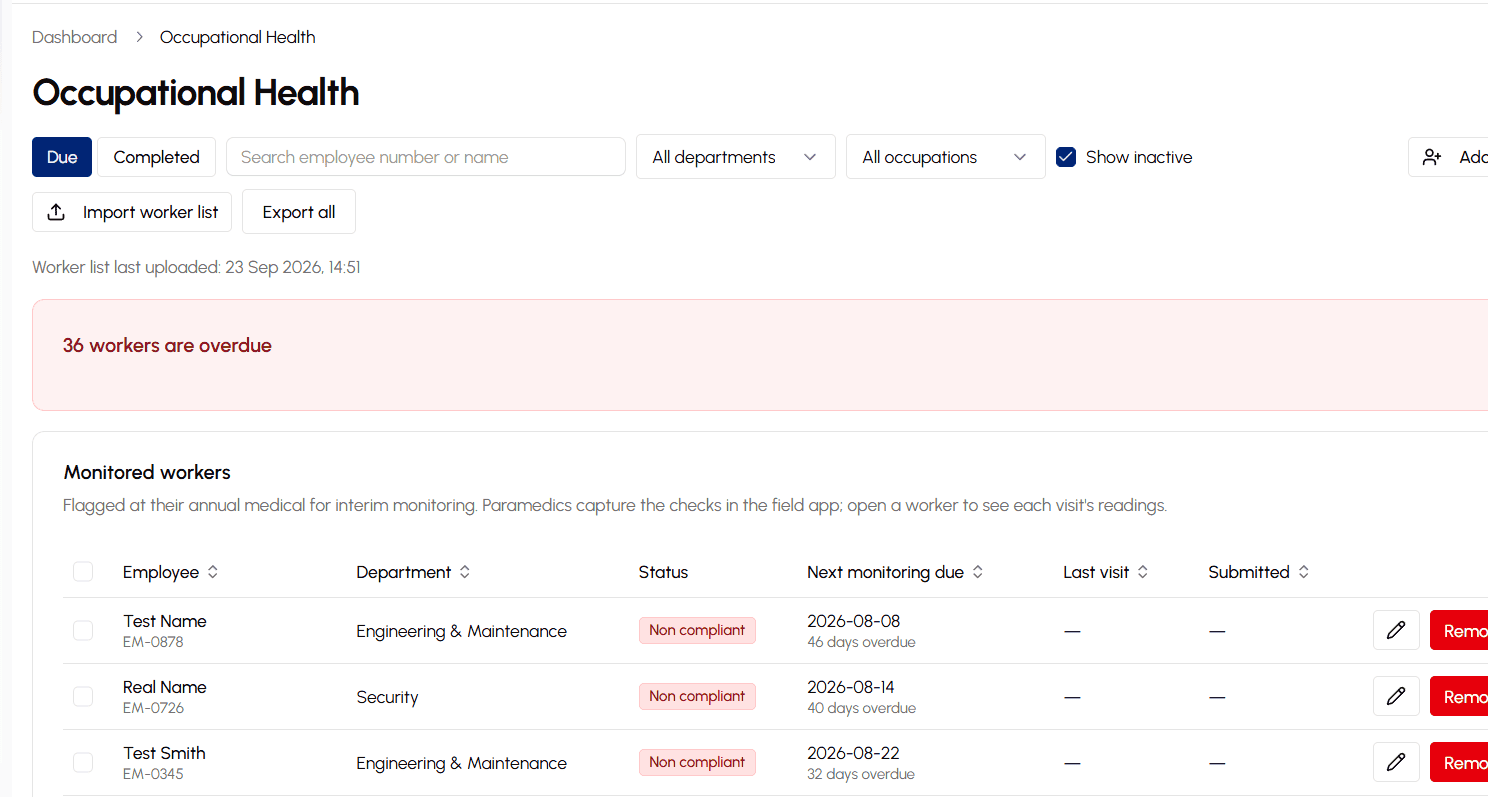
The dashboard shows every monitored worker with a colour-coded status and their next due date. An overdue banner counts every worker who has lapsed, across the whole list.
Paramedics work from a live due list
The field app lists who has to be seen in the next 7, 30 or 90 days, with overdue workers grouped at the top in red. Nobody has to assign workers to paramedics. The crew see who is due and choose their own order.
Capture the visit on a structured form
Identity confirmation, the worker's signed consent, the reason for the check, vital signs, any chronic medication the worker received elsewhere and, if needed, a booking to the medical centre. The worker's next due date moves forward as soon as the visit is saved.
The visit goes to the mine's occupational health system
Every saved visit is sent automatically to the mine's own occupational health system, configured for each mine. The receiving system's reference number is stored against the visit as proof of delivery.
For the mine's occupational health team
The people responsible for monitoring compliance get a current view of every monitored worker, without waiting for a spreadsheet and without clinical readings spilling into lists that get emailed around.
An import that is hard to get wrong
Each row needs an employee number and a valid South African ID number. ID numbers are checksum-validated and cleaned of spaces, and duplicates in the file are caught. If any row fails, nothing is written and the uploader gets a list of errors by row number, so a bad file can never half-load.
Dates are read day-first, the South African way, so 01/02/2026 is always the first of February. A blank cell is treated as "no information" rather than "no": a missing active flag won't deactivate anyone, and a blank medical aid column won't wipe anyone's medical aid.
An import can put a worker on monitoring but never takes one off. If next month's export leaves someone out, they stay on the list. Removing a worker is always a separate, confirmed action on the dashboard.
A schedule that stays anchored
Each worker has an interval and a next due date. When a check is captured, the next due date moves forward one interval from the current due date, not from the day the worker was seen, so a worker checked a few days early doesn't drag their schedule forward. If they were overdue, the visit restarts the schedule from today and clears them off the overdue list straight away. An interim check never extends the annual medical, and the mine's next upload can always correct a due date.
Due and completed views
Search by name or employee number, filter by department and occupation using the mine's own values, and switch between who still has to be seen and who has been checked, with the name of the paramedic who did it.
A full visit timeline
Every visit for a worker, including amended versions: who captured it and when, whether it was escalated or flagged, the signed consent, and how it landed in the mine's system. A failed delivery shows its full reason so someone can chase it.
Monitoring compliance report
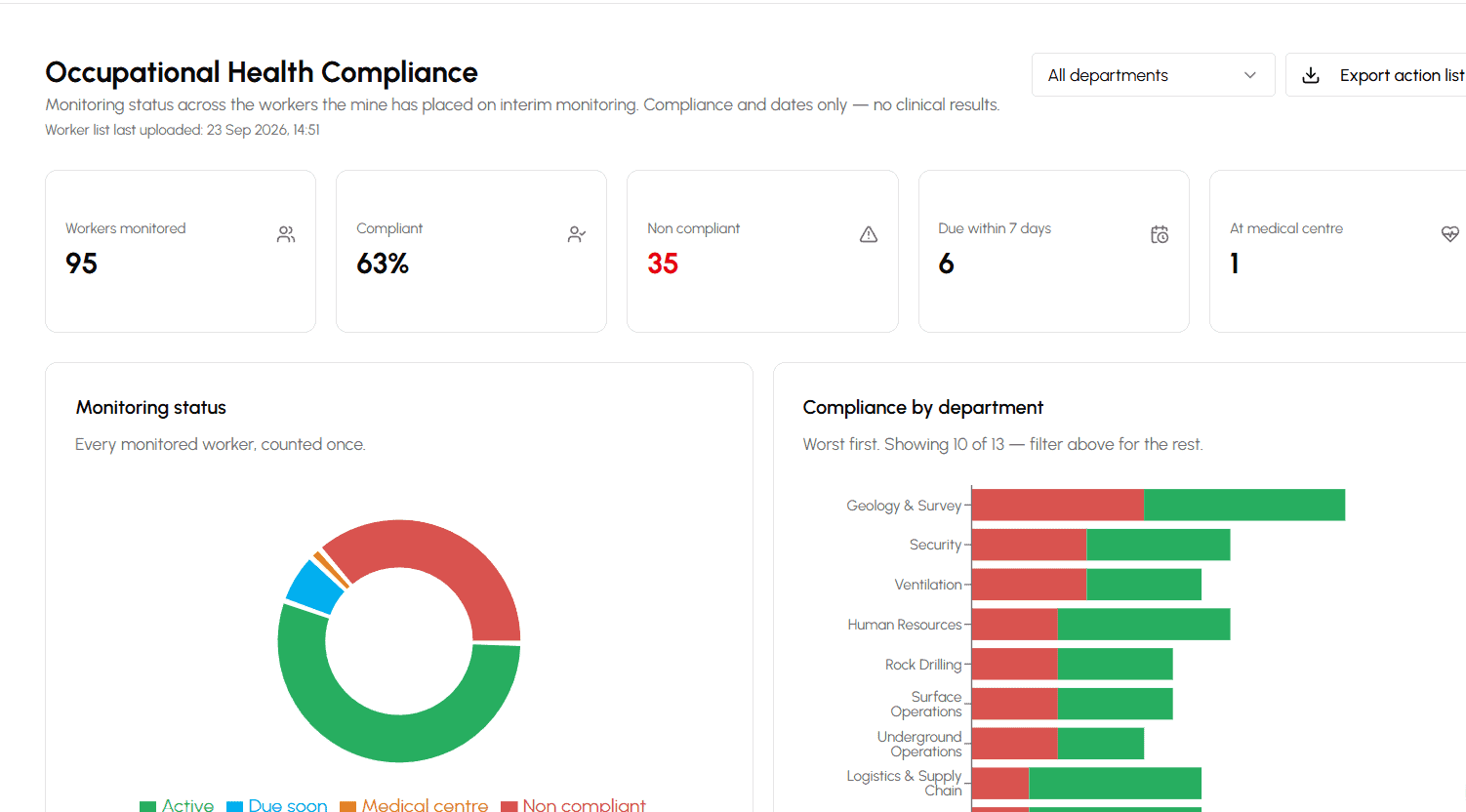
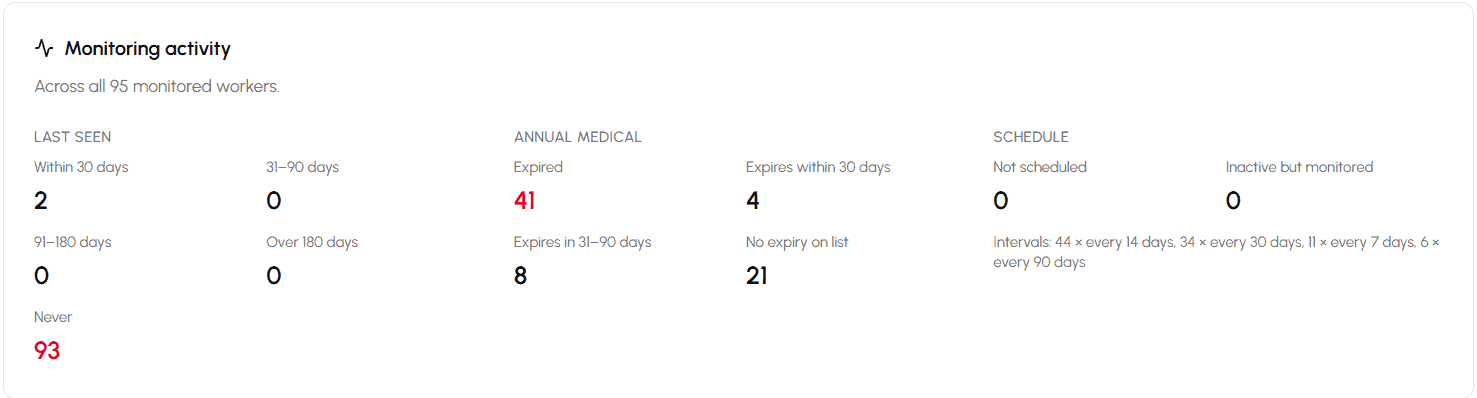
Compliance rate across monitored workers, broken down by status, department, age group and declared chronic condition. It also shows delivery health, time since last visit, annual medical expiries and data-quality flags, and ends with an action list sorted worst first.
Annual medical expiries
The report groups workers by how soon their annual medical expires. Once it lapses, the worker needs a new medical rather than another interim check, so seeing it coming matters.
Excel exports that are safe to share
Export selected workers or a whole filtered list, stamped with who exported it and when. Exports and the compliance report carry statuses and dates, never clinical readings.
Add and correct workers by hand
Add a worker the export missed, or correct identity, contact, medical aid and schedule details. A duplicate employee number is refused rather than overwriting someone else's record.
The monitoring compliance report
For the paramedics doing the checks
The field app gives site crews one place to see who is due and a form built for a phone. OHS Checks sits in the same app they already use for patient report forms, behind the same login, with a home-screen tile and a single "OHS checks due" line on their task card.
Illustration of the visit form. Readings are examples.
One visit, one form

Built for the way site crews actually work
Search reaches every worker on the mine's list, due or not, so walk-ins and workers seen in passing can be captured too. If a worker was already checked this cycle, the app says so, names who did it and offers to show the earlier visit before anyone captures a duplicate.
Missing fields are listed at the top of the form as links that jump to the right place, which matters on a long form on a small screen. Readings are judged once the paramedic leaves the field, so typing "7" on the way to "72" never sets off a false alarm.
Corrections without losing history
Nothing is edited in place. Amending a visit creates a new version with a required reason, such as "systolic transposed on capture". The original stays readable and is marked as superseded, keeping the date and time the worker was actually seen and the consent they signed at the time.
The amendment goes to the mine's occupational health system as a new version that names the one it replaces, so both sides hold the same history.
An emergency reading stops the visit. Every reading is scored against set thresholds. An abnormal reading is flagged in amber and the visit continues. A reading in the emergency range turns red, pins a banner to the top of the screen and tells the paramedic to stop the monitoring visit and act under their own emergency scope. They can leave the visit without finishing the form. The thresholds apply whatever the reason for the visit, so a hypertensive crisis picked up on a routine diabetes check still triggers the stop.
Why it matters that this runs inside ODIN
EMS providers on mine contracts often end up running several unconnected systems: one for patient report forms, one for billing, a spreadsheet for monitoring, and whatever the mine uses for occupational health. Each holds its own copy of the same worker, and someone has to keep them in step. ODIN Occupational Health runs on the same platform, records and logins as the rest of ODIN, so a worker is one person in one system.
One patient record
Every imported worker is linked to an ODIN patient record, matched on their SA ID number. Date of birth and gender come from the ID number itself.
Patient report forms
When a crew looks up a mine worker on a PRF, ODIN offers the mine's records for them: contact details, employer, next of kin, medical aid and declared chronic condition.
Billing
Monitoring uses the same medical aid data as ODIN's billing module: plan list, member number, dependant code and main member.
Staff and permissions
Paramedics capture visits on their normal ODIN accounts. The capturing paramedic comes from their login and is never typed in.
Dashboard and reports
The Occupational Health page and compliance report sit in the same dashboard and reports area your office team already uses.
A worker's first ambulance call starts with what you already know
When a crew writes a patient report form and looks the patient up by ID number, and that patient is on a mine's monitoring list, ODIN offers the employer's details with a "Use these details" option. The crew review them and confirm them with the patient. Nothing is filled in silently, but the crew don't start from a blank form on someone the service has been seeing every month.
The declared chronic condition goes into the medical history, which is exactly what a crew wants to know about a worker who collapses underground.
One view of the patient
The dashboard's patient record shows every patient report form written for a person and, for a mine worker, their occupational health monitoring history, where the user has permission to see it. A patient report form links straight back to that record.
Because the monitoring form uses the same vital signs definitions as the patient report form, a blood pressure reading means the same thing in both places. A reading taken on a monitoring visit and one taken on an emergency call can sit side by side without translation.
Separate tools for each job
One platform
The mine's occupational health system stays in charge
Under the Mine Health and Safety Act, medical surveillance belongs to the mine and its occupational medical practitioner. ODIN is built to support that, not replace it. It captures, schedules, reports and submits. It never decides who is fit for work. The Mine Health and Safety guide explains the surveillance duties in sections 11 to 20 of the Act.
What stays with the mine
How visits reach the mine
Saved first, sent second
The visit is saved in ODIN before anything is sent. If the mine's system is down or rejects the data, the paramedic's capture is never lost.
Proof of delivery
The receiving system's reference number is stored against the visit and shown in the app and on the dashboard.
Visible status, one-tap resend
Every visit shows as pending, submitted or failed, with the reason for any failure. A visit that didn't get through can be resent from the field app.
A fixed destination for each mine
The destination is set for each mine and is required before the module will run, so readings can't be sent to a wrong or default address.

Built with POPIA in mind
Blood pressure and glucose readings are health information, which POPIA treats as special personal information. The module is designed so the people who manage compliance can do their job without ever seeing a reading, while the readings still reach the mine's practitioners.
Clinical data kept apart
The status side of the system, covering worker lists, due dates, compliance views, exports and the report, has no field that can hold a reading. Readings live only on the clinical side.
Two separate roles
One permission manages the worker list and compliance views with no access to readings. The other captures visits and sees readings. The server enforces the split, not just the screen.
A signature on every visit
The worker signs on screen before any readings are recorded, and the signature is stored with that specific visit.
Set by the server, not the device
The visit time, the capturing paramedic and the score of every reading are all set on the server. A phone can't back-date a visit or decide its own readings are normal.
Append-only corrections
Every amendment is a new version with a required reason. Superseded versions stay on the worker's timeline, readable by anyone with clinical access.
Switched on per client
The module is licensed per client. Until it is switched on, it doesn't appear anywhere in the dashboard or field app, and ODIN works exactly as before.
Pricing
Add-on module
Quoted separately for each contract
ODIN Occupational Health is an add-on to ODIN ERP. It isn't part of the standard plans, so we quote it for your operation after a short conversation about the mine or site you are working on.
Request a quoteFrequently asked questions
What is ODIN Occupational Health?
An add-on module for ODIN ERP that digitises interim health monitoring on mines. It imports the mine's list of monitored workers, shows who is due and overdue, gives paramedics a structured visit form on a phone or tablet, and sends every visit to the mine's own occupational health system.
Does ODIN decide whether a worker is fit for work?
No. Fitness for work, compliance and mine access stay with the mine's occupational health system and its occupational medical practitioner. ODIN captures, schedules, reports and submits. The only action a paramedic can take beyond recording is to book the worker to the medical centre.
Which conditions can be monitored?
Four protocols: hypertension, diabetes, a TB symptom screen and obesity. A paramedic can tick more than one on a visit, and every reading is scored against set thresholds whatever the reason for the visit.
How does the worker list get into ODIN?
The mine uploads its existing export as an Excel or CSV file. ID numbers are validated, and if any row fails nothing is written. There is no live connection to the mine's HR system, so the list is refreshed by uploading the next export.
Does it work without signal?
Not for capture. The app stays open on a device that loses signal, but saving a visit needs a connection. Tell us about coverage on your site when we scope the contract.
How much does ODIN Occupational Health cost?
It is an add-on to ODIN ERP and is quoted separately for each contract. The ODIN ERP plans themselves are listed on the pricing page, and every plan includes all core features.